AI Design, Product Design, Design Tools, AI Agents, Figma, Design Process
For a while, I believed the future of design would happen in code.
Vibe coding took off. We could describe what we wanted, let an agent build it, and get a working app. Then these tools added design mode, letting us adjust layouts, refine the UI, and change styles without ever opening a traditional design tool.
It felt like the future of design was moving into code.
But something was still missing.
These tools were built to produce software, not explore design directions. I might have five ideas, place them side by side, see them all at once, compare them, combine some of the good parts, and even get new ideas just by looking at the options together. A code editor naturally pushes toward one working result: prompt, generate, refine. I can request five versions, but comparing and combining them side by side is harder. Being able to work in multiple directions matters because design often starts without a clear answer.
Paper, a fairly new design tool, takes a different approach by letting agents work directly on the design canvas. We can describe a screen, component, or variation, and the agent creates it directly on the canvas as something we can edit.
That brings AI into the space where designers usually work. And that’s exactly the idea behind bringing agents onto Paper’s canvas: designers still need a visual space to think.
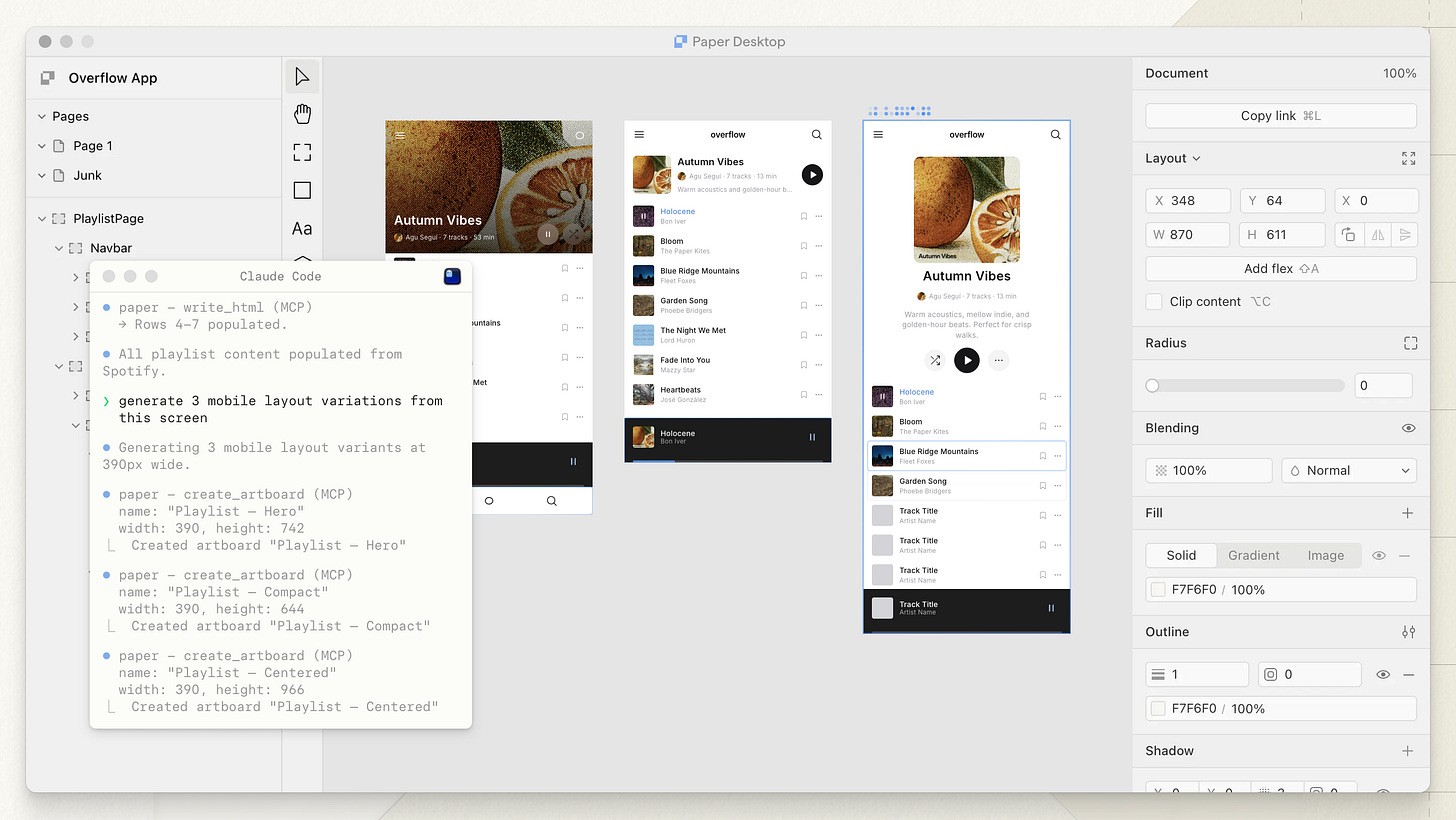
Paper’s move to bring agents onto the canvas quickly drew attention. Just a couple of weeks earlier, Figma introduced a workflow that let us bring what we prototyped in code into Figma as editable layers. Soon after, Figma made a similar move, cutting out the step through code and letting agents work directly on the canvas (it gave me a bit of déjà vu. Agents on the canvas felt a lot like Figma’s old “Make Designs” feature, just with better models this time).
Prompting is faster
Let’s start with something simple: a button.
Instead of reaching for different tools and adjusting each property yourself, describe the result you want.
“Make a rounded button, 44px tall, using the primary color from my design system.”
Done.
Compare that with doing it yourself: draw a rectangle, adjust the corner radius, open the color picker, and find the right token. That’s a lot of steps for one button.
You might still be faster making that button manually. The agent can take a moment, especially at the beginning, while it’s loading files, understanding the context, marinating, schlepping, concocting, and doing whatever else agents do behind the scenes.
But try something more complex.
Prototype an order-history screen with a timeline showing each order’s status. Every step needs a timestamp, a status icon, and a connecting line. Each order should also be collapsible.
Building that manually could take hours. You’re dealing with layout, spacing, states, icons, hierarchy, interactions, transitions, and more.
An agent can give you a first version in minutes. It might not be perfect. It could be generic (yes, slop, if you want to call it that).
But if we’re designing the same thing, prompting can be dramatically faster than doing all the cursor work yourself.
So what is the mouse still giving us?
If we can prompt what we want and get there faster, is that simply the new way to design?
The mouse and the prompt
With a mouse, our hands are directly in the work. We drag, place, resize, and adjust.
With prompting, we describe what we’re thinking. AI interprets it and makes something for us.
Both are ways of creating, but they feel different.
With prompting, the loop is: think, describe, see the result.
With a mouse, the loop is: move, look, adjust.
We might place a button, look at it, and think: What if it were a ghost button instead? What if we moved it to the left? What if the label were shorter?
We don’t always start with a finished interface in our heads. Sometimes the next idea comes from moving something around and seeing what happens. I find that kind of work more hands-on. I can try something before I know exactly how to explain it.
How close do you need to be?
The way I see it, prompting and the mouse create different distances between us and the thing we’re making.
With prompting, we describe what we want and let the agent do the making. We make some decisions upfront, and if those decisions aren’t clear, the agent might ask follow-up questions or just fill in the gaps itself (depending on how you set it up or which agent skills you use).
With a mouse, we make those decisions more directly. We choose where something goes, how it looks, and how it relates to everything around it. And sometimes it’s simply faster to change something manually. Nudge this four pixels. Swap that component. Shorten the label. Done.
Some designers might prompt almost everything. Others still prefer to move things around themselves. Most of us will probably end up somewhere in between.
Maybe the skill now is knowing when to hand something over to the agent, and when to stay close to the work.
So, do designers still need a mouse?
I think so. Just maybe not for everything.
Until next time,
Thomas
Originally posted on my Substack.

Hi, I’m Thomas. Originally from Indonesia, now based in the Netherlands.
I’ve spent 15 years in tech, moving between engineering, design, and product. These days I’m building bloomworks, my own product studio, where I work with founders and organizations on digital products for well-being and mental health.
We also make our own things. One of them is Little Haven, a retro pixel pet designed around mental health and well-being. Think Tamagotchi, except this one tries to take care of you too.
Alongside that, I write about design and AI, mostly around how AI is changing the way we design, prototype, and build.
If you’re working on a project where design, technology, and wellness come together, I’d love to hear about it. Say hi – hi@thebuddyman.com